親密なダンスシーン、迫力ある追跡劇、幻想的な世界を、より自由な発想で演出。EaseGen Video Standardなら言葉や画像から最長30秒、最大1080pの動画を生成できます。サインインしてクレジットで生成を始めましょう。
動画サンプル: Wan 3.0。コンテンツ制限の少ない制作にはEaseGen Video Standardを選択してください。
描きたいストーリーを、もっと自由に
ありきたりな表現を超えて
EaseGenの制限なしAI動画生成ツールは、コンテンツ制限が少ないEaseGen Video Standardが標準で開きます。2人のダンサーの間にある緊張感、砂漠での猛追劇、普段の電車が海へとつながる光景など、自由な発想を試せます。画面内で何が起こるか、カメラがどう動くか、どのような音が響くかを言葉で伝えてみましょう。
ゼロからシーンを創る、写真を動かす
言葉からシーンを立ち上げるなら「Text to Video」、構図や被写体がすでに決まった画像があるなら「Image to Video」を選びます。カップルがターンを終える、ライダーがカメラ横を駆け抜ける、扉の向こうに異世界が広がるなど、シーンの始まりと結末を指定しましょう。
演出をコントロールできる、確かな創作の自由
クリエイティブの制限を緩和
EaseGen Video Standardなら、型にはまらないテーマや豊かな視覚的表現を形にできます。見慣れたシーンにとどまらず、独自のキャラクター、衣装、世界観、トーンを自在に追求できます。
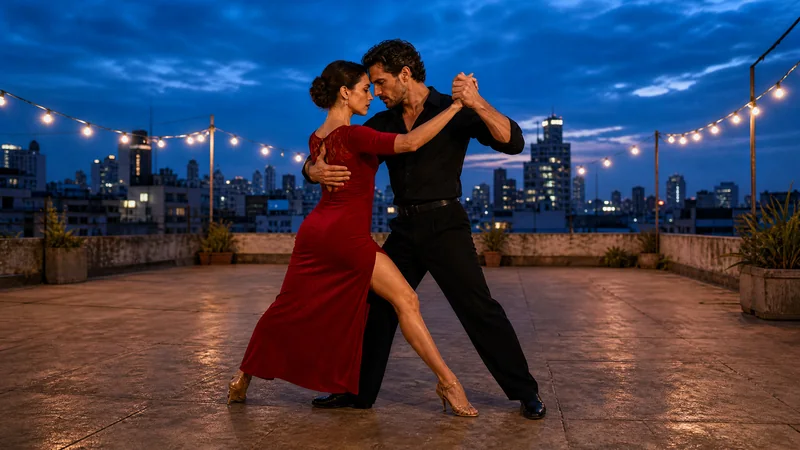
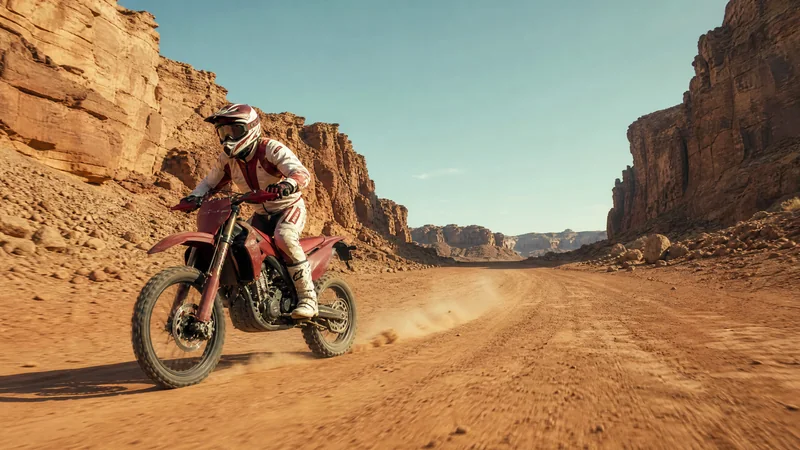
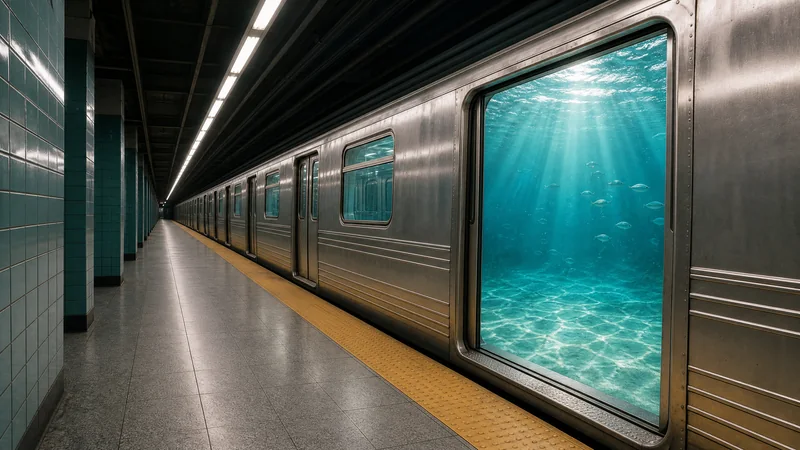
タンゴを演出し、砂漠のチェイスを追い、電車内に広がる海を描く。各サンプルには、Image to Videoで使える開始画像とプロンプトが含まれています。
ブルーアワーの屋上で踊るタンゴ
Animate the starting frame as a rooftop tango between two adult dancers. They take two measured steps in a close embrace, then complete a slow quarter-turn; the woman's crimson dress swings with the movement. Orbit gently around them at waist height while keeping both dancers and their feet in frame. Preserve their faces, clothes, the rooftop, and the blue-hour skyline. Request the soft sound of heels on the floor and distant city traffic. One continuous shot, no cuts.
GPT Image 2で生成された開始画像です(動画出力ではありません)。
砂漠のバイクチェイス
Animate the starting frame as a desert motorcycle chase shot. The rider accelerates along the sandstone canyon track, leaning slightly into a broad bend as dust rolls away from the rear tire. Track beside the motorcycle from a low three-quarter angle, then let the rider pull ahead toward the open road. Keep the helmet, protective suit, motorcycle, and canyon consistent. Request an engine rising in pitch, wind, and gravel under the tires. One continuous shot, no crashes or cuts.
GPT Image 2で生成された開始画像です(動画出力ではありません)。
海へとつながる電車
Animate the starting frame as an impossible subway arrival. Slowly push the camera along the dry platform toward the open train doorway. Inside the doorway, silver fish drift through turquoise ocean water and sunlight ripples across the carriage threshold, while the platform stays completely dry. Keep the train, tiles, doorway, and straight architectural lines consistent. Request a fading train hum followed by a soft underwater rumble. One continuous shot, no cuts or text.
GPT Image 2で生成された開始画像です(動画出力ではありません)。
EaseGenの制限なしAI動画生成ツールの使い方
ステップ 1
シーンの入力または画像の用意
EaseGen Video Standardが選ばれた状態で進めます。「Text to Video」でシーンを言葉で入力するか、「Image to Video」に切り替えて開始画像を追加してください。上記のサンプルのプロンプトと画像を使うこともできます。
いいえ、そうではありません。EaseGenにおける「制限なし」とは、コンテンツ制限が少ないEaseGen Video StandardやProが提供する、より高い創作の自由度を指します。EaseGenの利用規約に基づく一定のコンテンツ制限は適用されます。また、モデルによって制限基準が異なる場合があります。
EaseGen Video Standardでは、JPEG、JPG、PNG、WebP、BMP形式の画像をそれぞれ最大20MBまでご利用いただけます。ご自身に使用権のある画像をご利用ください。Standardでは、画像から動画への出力は参照画像のアスペクト比に従うため、あらかじめ必要な形式で画像をご用意ください。
画像だけでなく動画や音声の参照も使えますか?+
はい。「画像から動画」では、EaseGen Video Standardは画像、動画、音声の参照に対応しています。参照動画は各1–15秒で、参照動画の合計は最大15秒までです。また、参照動画の長さと出力動画の長さの合計は30秒以内に収める必要があります。参照音声は各1–15秒で、音声の合計は最大15秒までです。