Free Online Nano Banana 2.1 AI Image Generator

Create with Gemini Nano Banana 2.1 for improved text and layouts, detailed photographs, and cleaner extreme-format images at 2K and 4K. Sign in with Google; eligible new accounts get 20 free credits, enough for one 1K or 2K image.

Exhibition Poster

What Is Nano Banana 2.1?

Nano Banana 2.1 is Google's October 2026 update to Nano Banana 2, its Gemini image generation and editing model. It improves the way text and infographic elements fit together, refines photographic detail, and fixes tiling artifacts in high-resolution images with extreme proportions.

That makes this version a useful choice for exhibition graphics, illustrated explainers, textured product photography and panoramic artwork. It works from a written brief or an existing image, so you can develop a new composition or refine the details of a reference.

Google Model Documentation · Model details checked October 9, 2026.

What's New in Nano Banana 2.1 vs. Nano Banana 2?

Compared with Nano Banana 2, version 2.1 improves text and infographic layouts, refines realism at 1K, 2K and 4K, and fixes tiling artifacts in 2K/4K images at extreme aspect ratios. 4K output and extreme ratios were already available in Nano Banana 2.

Improved Text and Layouts

Version 2.1 improves in-image text rendering and the placement of infographic elements. Headlines, labels and supporting visuals can work together in a clearer hierarchy, rather than competing for space.

Give the model your exact words in quotation marks, then describe their relative size and position. A short exhibition title, date and venue make a focused starting point for a poster; a diagram benefits from named parts and explicit connections.
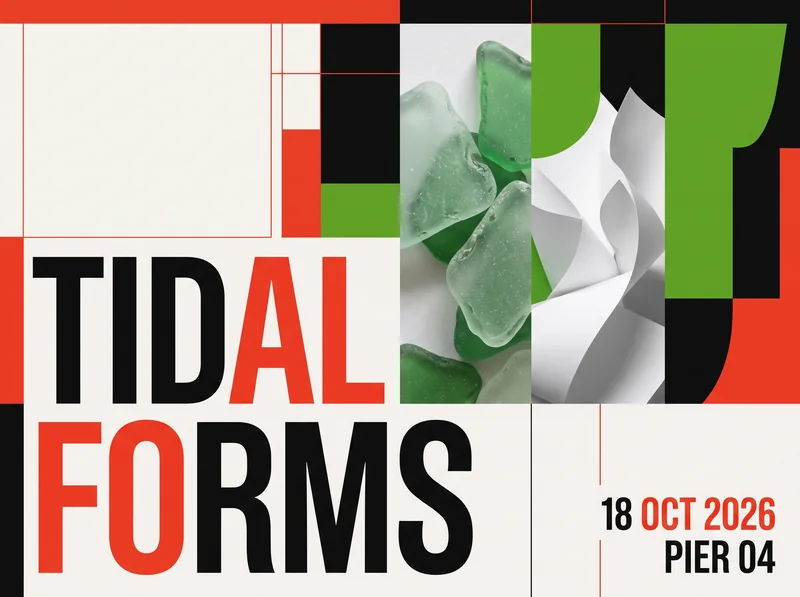
Nano Banana 2.1 exhibition poster with TIDAL FORMS, 18 OCT 2026 and PIER 04 lettering
Exhibition Poster · 2K · 4:3

Sharper Photographic Detail

Nano Banana 2.1 refines realism and visual quality across 1K, 2K and 4K. Use that refinement for skin, fabric and material textures in photographs where small surface details carry the image.

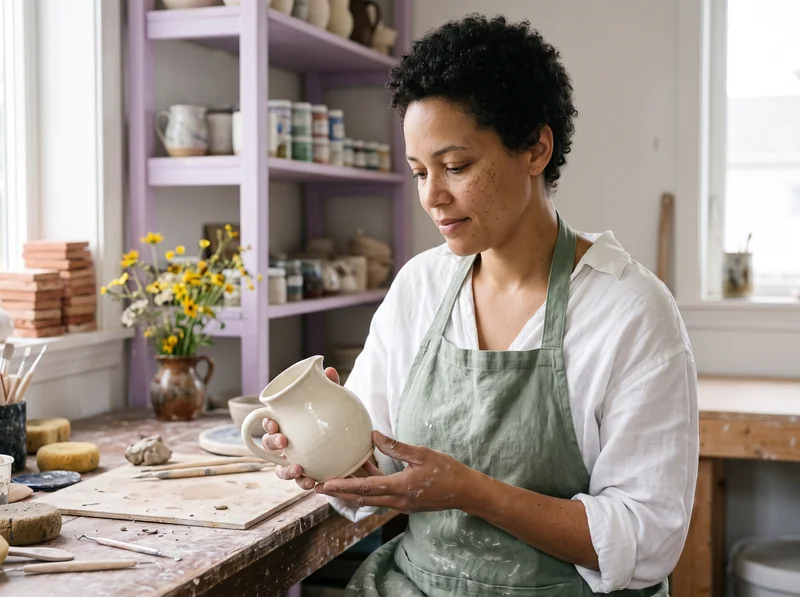
Describe the light and materials as carefully as the subject. For a ceramic portrait, that means the glaze, linen fibers, hand positions and window light. When editing, identify those details as things to retain while you change the setting.

Ceramic artist holding an ivory pitcher with visible skin, glaze and linen textures
Ceramic Studio Portrait · 2K · 4:3

Cleaner Extreme Aspect Ratios

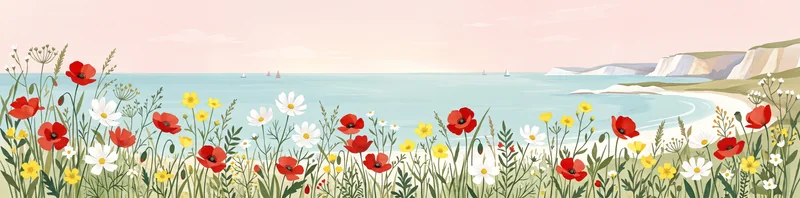
The 2.1 update fixes the tiling artifacts found in 2K and 4K outputs at 1:4, 4:1, 1:8 and 8:1. These proportions give wide banners and tall artwork room to develop as a complete composition.

Plan the entire frame instead of asking for a standard image you will crop later. Place subjects across the width of a panorama, or describe a clear top-to-bottom arrangement for a tall design. Choose the proportion in the generator before creating the image.

Continuous 4:1 panorama of colorful coastal flowers, turquoise sea and chalk cliffs
Coastal Flower Panorama · 2K · 4:1

Create With Nano Banana 2.1

  1. Step 1

    Choose Your Starting Point

    Use Text to Image for a new scene, or Image to Image to upload the references you want to work from.

  2. Step 2

    Describe the Result

    Name the subject, composition and lighting. For edits, specify what to preserve and what to replace; use @ references to distinguish multiple images.

  3. Step 3

    Generate and Refine

    Set the aspect ratio, resolution and output format, then generate. Review your result, download it, or use Recreate to adjust the same inputs.

Nano Banana 2.1 Prompt Examples

Explore four results made with this model. Each example includes its original prompt and generation settings.

Exhibition Poster

Text to Image · 2K · 4:3 · PNG

A finished flat graphic design exhibition poster, landscape 4:3 canvas shown straight-on with the entire design visible edge to edge, no mockup and no frame. Print-quality contemporary Swiss-inspired editorial design. Very large perfectly legible typography reads exactly "TIDAL FORMS" in two lines. Smaller but clearly readable typography reads exactly "18 OCT 2026" and "PIER 04". No other text. The artwork pairs a photographic close-up of translucent green sea glass and sculptural white paper forms with a crisp geometric grid. Bold vermilion red, vivid leaf green, black and clean white color palette, balanced negative space, tactile fine paper grain. Inventive but disciplined layout with professional typography, sharp letters, clear text hierarchy. Fictional exhibition, no logos, no brand names, no watermark, no interface elements.

Nano Banana 2.1 exhibition poster with TIDAL FORMS, 18 OCT 2026 and PIER 04 lettering

Ceramic Studio Portrait

Text to Image · 2K · 4:3 · PNG

A close environmental documentary photograph of an adult woman ceramic artist in her thirties at a pottery workbench, full head, shoulders and both hands clearly visible within a landscape 4:3 composition with generous safe margins. She has short dark curly hair, natural skin texture and freckles, wears a sage-green linen apron over a white shirt, and gently holds a complete small ivory glazed ceramic pitcher with a curved handle in both hands. The entire pitcher and fingers are visible, believable anatomy. Camera at eye level, medium-close framing. Sunlit working pottery studio with lilac painted shelves, terracotta test tiles and a small vase of yellow flowers softly behind her. Focus on tactile glazed ceramic, subtle fingerprints, linen fibers and honest skin texture. Soft daylight, editorial photography, realistic color, quiet candid expression. No text, no logos, no celebrities, no watermark, no artificial beauty retouching.

Ceramic artist holding an ivory pitcher with visible skin, glaze and linen textures

Coastal Flower Panorama

Text to Image · 2K · 4:1 · PNG

Create a finished panoramic fine-art floral coastal poster in a true ultra-wide 4:1 canvas. Compose a continuous full-width landscape from left edge to right edge, no inset panel, no frame, no mockup, no text. In the foreground, a graceful meadow of scarlet poppies, white cosmos, butter-yellow wildflowers and fine green stems spans the entire width, with every flower head completely visible and space above and below. Beyond it is a pale turquoise sea, a curving white coastline and distant chalk cliffs under a pale clear pink sky. A sophisticated hand-painted gouache and cut-paper aesthetic with visible pigment grain, clean shapes and restrained organic detail. Flowing left-to-right composition, lively red-green accents, luminous whites, balanced visual weight across all four quarters. An actual finished artwork designed specifically for the extreme panoramic format, not a crop of a standard image. No brand marks, no watermark, no interface.

Continuous 4:1 panorama of colorful coastal flowers, turquoise sea and chalk cliffs

Studio to Greenhouse

Image to Image · 2K · 4:3 · PNG

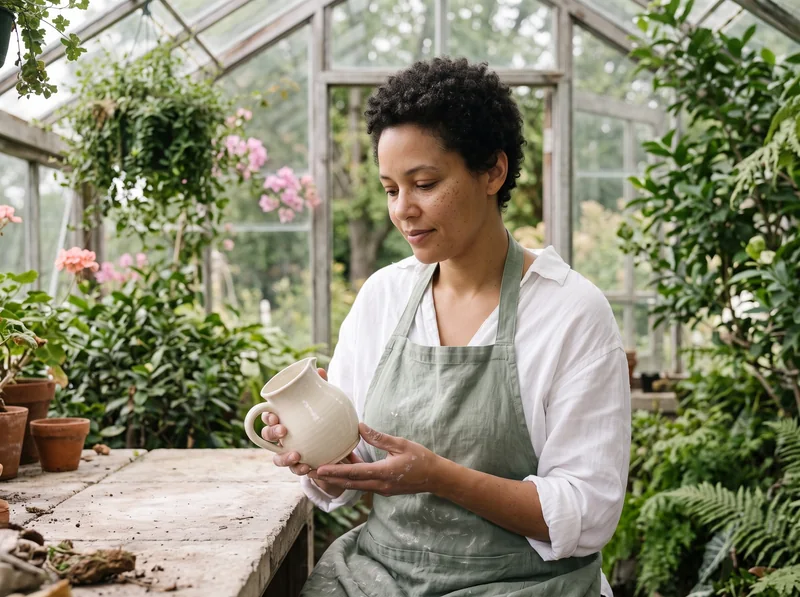
Edit the uploaded reference photograph. Preserve the exact same woman, her face, short dark curly hair, freckles, expression, sage-green apron, white shirt, both hand positions and the complete ivory ceramic pitcher, including its curved handle, glaze, proportions and camera angle. Keep her and the pitcher at the exact same scale and position within the 4:3 frame. Replace only the pottery studio background with an airy outdoor greenhouse: clear glass window structure, lush green foliage, a few soft pink flowers, pale stone workbench and diffused morning daylight. Match the foreground lighting naturally to the greenhouse while retaining honest skin texture, linen fibers and the ceramic details. The full head, both hands and entire pitcher remain visible. Realistic editorial photograph, no text, no added people, no logos, no watermark, no illustration.

Original ceramic studio portrait used as the reference
Reference
Reference portrait edited into a greenhouse while retaining the artist, hands and ceramic pitcher
Result

Nano Banana 2.1 vs. Pro and Nano Banana 2

Start with Nano Banana 2.1 for the latest layout and detail improvements at a lower credit cost. Nano Banana Pro is Google's separate model for complex design briefs and product mockups. Nano Banana 2 is useful when you need more than ten reference images.

ModelBest FitReference ImagesResolution2K Credits
Nano Banana 2.1Text-led layouts, detailed photos and high-resolution extreme formatsUp to 101K / 2K / 4K18No Membership Required
Nano Banana 2Reference-heavy projects that need more than ten imagesUp to 141K / 2K / 4K24No Membership Required
Nano Banana ProComplex graphic design and product mockupsUp to 81K / 2K / 4K24Membership Required

Credits are per 2K image on EaseGen, for both generation and editing. Google's Nano Banana Pro Guide

Nano Banana 2.1 vs. GPT Image

Nano Banana 2.1 vs. GPT Image 2

Nano Banana 2.1 is Google's image model; GPT Image 2 is OpenAI's. On EaseGen, Nano Banana 2.1 supports up to 10 reference images and offers 4:1 and 8:1 output. GPT Image 2 supports up to 16 references and offers 3:1 and 1:3 output. Use Nano Banana 2.1 for those wider formats and GPT Image 2 when you need more than ten references.

Try GPT Image 2

Nano Banana 2.1 vs. GPT Image 2.5

For an 8:1 banner or 1:8 design, use Nano Banana 2.1. On EaseGen, GPT Image 2.5 Flare and Sunburst support up to 16 reference images, compared with 10 for Nano Banana 2.1. Both 2.5 variants offer 1K, 2K and 4K output, but neither offers 4:1, 1:4, 8:1 or 1:8. Try GPT Image 2.5 when your composition needs more references at a supported ratio.

Try GPT Image 2.5

Nano Banana 2.1 FAQ

Where Can I Use Nano Banana 2.1 Online?

You can use Nano Banana 2.1 on EaseGen to create images from text or edit reference images in your browser. Sign in to an EaseGen account to generate. You do not need a separate Google AI subscription or your own API key.

Can I Use Nano Banana 2.1 for Free?

Yes. Eligible new EaseGen accounts receive 20 free credits after signing up, enough for one Nano Banana 2.1 image at 1K or 2K. Each image costs 12 credits at 1K, 18 credits at 2K, or 27 credits at 4K, for both generation and editing. Further generations require enough credits in your account.

What Should I Do if the Lettering Is Wrong?

Shorten crowded labels and give the text more space, then generate again. Check spelling, numbers and alignment before publishing or printing. For a final logo or a layout that needs exact typography, add the lettering in a dedicated design editor.

What Happens if a Generation Fails?

Credits reserved for a failed generation are returned when the failure is confirmed. Check your credit history before retrying, and adjust the prompt or references if the error asks for a change.

Explore More Image Models

Nano Banana 2

Bring up to fourteen reference images into one generation.

GPT Image 2

Try another image model with support for up to sixteen references.

Create Your Next Image